Ultimi componenti aggiuntivi
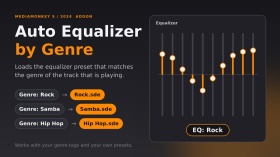
Carica automaticamente un preset dell'equalizzatore al cambio di traccia, in base al genere della traccia. Il preset deve essere un file con lo stesso nome del genere all'interno della cartella Equalizer (ad esempio, genere "Rock" → EqualizerRock.sde). I generi senza preset mantengono le impostazioni correnti dell'equalizzatore. Sono supportati più generi ("Rock; Pop"): viene utilizzato il primo per cui è presente un file di preset. Un breve messaggio "EQ: Rock" viene visualizzato quando il preset cambia.
Testato su MediaMonkey 2024.2.2.3222 (Windows). Ispirato allo script AutoEQ.vbs del 2006 di DiddeLeeDoo, questo componente aggiuntivo è un codice originale scritto da zero per MediaMonkey 5.
In portoghese: carica automaticamente il preset dell'equalizzatore conforme o il genero da faixa. Il file del preset deve avere lo stesso nome del genere, all'interno del formato Equalizer.
Translated automatically (see original)Automatically loads an equalizer preset when the track changes, based on the track’s genre. The preset must be a file named exactly like the genre inside the Equalizer folder (e.g. genre “Rock” → EqualizerRock.sde). Genres without a preset keep your current equalizer settings. Multiple genres (“Rock; Pop”) are supported: the first one with a preset file is used. A short “EQ: Rock” message shows when the preset changes.
Tested on MediaMonkey 2024.2.2.3222 (Windows). Inspired by the 2006 script AutoEQ.vbs by DiddeLeeDoo; this addon is original code written from scratch for MediaMonkey 5.
Em português: carrega automaticamente o preset do equalizador conforme o gênero da faixa. O arquivo do preset deve ter o mesmo nome do gênero, dentro da pasta Equalizer.
Hide original
By
Fernando Santos & Claude
Inviato da FernandoSantos
Aggiornato 14/10/2026
Cronologia delle versioni / Dettagli
- Versione:
- 1.1
- Aggiornato:
- 14/10/2026
- Size:
- 2.99 KB
- Licenza:
- MIT (permite usar e modificar, mantendo os crédito
- Funziona con:
- Media Monkey 2024.2
- Modifiche:
Version 1.1.0 - first public release.
- Automatically loads the equalizer preset that matches the track's genre (Equalizer<Genre>.sde).
- Finds the Equalizer folder on its own (no fixed paths).
- Genres without a preset keep your current EQ (the file is checked first, because loading a missing preset resets the EQ to flat).
- Multiple genres (Rock; Pop) supported: the first one with a preset is used.
- Short "EQ: <preset>" message that disappears on its own.
Tested only on MediaMonkey 2024.2.2.3222 (Windows).Versão 1.1.0 - primeira versão pública.
- Carrega automaticamente o preset do equalizador correspondente ao gênero da faixa (Equalizer<Gênero>.sde).
- Encontra a pasta Equalizer sozinho (sem caminhos fixos).
- Gêneros sem preset mantêm o seu EQ atual (o arquivo é verificado antes, pois carregar um preset inexistente zera o EQ).
- Vários gêneros (Rock; Pop): usa o primeiro que tiver preset.
- Aviso rápido "EQ: <preset>" que some sozinho.
Testado apenas no MediaMonkey 2024.2.2.3222 (Windows).
Album Rating Node aggiunge un sotto-nodo "Album Rating" alle tue collezioni. Raggruppa gli album di una collezione in base al loro punteggio (da 5 stelle a 0,5 stelle, pessimo e sconosciuto), permettendoti di visualizzare a colpo d'occhio gli album con il punteggio migliore e peggiore, in modo simile al nodo Rating esistente per i brani, ma basato sugli album.
IMPORTANTE: L'attivazione del nodo richiede una licenza MediaMonkey Gold. Il nodo secondario si attiva nelle impostazioni della raccolta e la modifica o la creazione di raccolte è una funzionalità della versione Gold (la versione gratuita mostra invece la finestra di dialogo per la registrazione alla versione Gold).
Translated automatically (see original)Album Rating Node adds an "Album Rating" sub-node to your collections. It groups the albums of a collection by their album rating (5 stars down to 0.5 stars, bomb and Unknown), so you can browse your best and worst rated albums at a glance, similar to the existing Rating node for tracks, but based on albums.
IMPORTANT: Enabling the node requires a MediaMonkey Gold license. The sub-node is switched on in the collection settings, and editing or creating collections is a Gold feature (the free version shows the Gold registration dialog instead).
Hide original
By
AI (inspired by Fetzenschaedl)
Inviato da fetzenschaedl
Aggiornato 11/10/2026
Cronologia delle versioni / Dettagli
- Versione:
- 0.1
- Aggiornato:
- 11/10/2026
- Size:
- 19.83 KB
- Funziona con:
- Media Monkey 2024 - 2027
Cover Browser sostituisce l'anteprima predefinita della singola copertina di MediaMonkey con un visualizzatore esteso che consente agli utenti di scorrere e ispezionare tutte le copertine incorporate (fronte, retro, pagine del libretto, dischi, ecc.) per un brano o un album.
Caratteristiche principali
Navigazione tra le copertine: scorri tutte le copertine utilizzando i tasti freccia, i pulsanti sullo schermo o la rotellina del mouse (con funzione di avvolgimento opzionale).
Barra informativa dettagliata: visualizza la posizione del contatore delle copertine, il tipo di copertina, le dimensioni in pixel/file e la posizione di archiviazione.
Comandi dell'immagine:
Rotazione: rotazione di 90° (ideale per pagine di opuscoli scansionate).
Zoom e panoramica: zoom dal 25% al 400% con scorrimento tramite trascinamento.
Adatta la finestra all'immagine: ridimensiona e riposiziona la finestra per adattarla alle proporzioni della copertina senza oltrepassare i bordi della barra delle applicazioni.
Supporto per opuscoli PDF: visualizza gli opuscoli PDF incorporati direttamente all'interno del visualizzatore.
Interfaccia utente a scomparsa automatica: la barra degli strumenti scompare automaticamente in caso di inattività del mouse.
Modalità di riserva sicura: funziona come la visualizzazione predefinita se è presente una sola copertina o se il caricamento non riesce.
Limitazioni note
Ambito di visualizzazione dell'album: per gli album, vengono visualizzate solo le copertine relative alla prima traccia .
Limitazioni dei PDF: i libretti in formato PDF non possono utilizzare gli strumenti personalizzati di rotazione, zoom o adattamento della finestra del componente aggiuntivo (utilizzano invece gli strumenti integrati del visualizzatore PDF). Il supporto per le immagini PDF dipende anche dalla versione di MediaMonkey.
Allineamento rotazione zoom: la rotazione di 90°/270° con lo zoom attivo potrebbe apparire leggermente decentrata.
Cover Browser replaces MediaMonkey default single-cover preview with an extended viewer that allows users to cycle through and inspect all embedded covers (front, back, booklet pages, discs, etc.) for a track or album.
Key Features
Multi-Cover Navigation: Flip through all covers using arrow keys, on-screen buttons, or the mouse wheel (with optional wrap-around).
Detailed Info Bar: Displays cover counter position, cover type, pixel/file size, and storage location.
Image Controls:
Rotate: 90° rotation (ideal for scanned booklet pages).
Zoom & Pan: 25% to 400% zoom with click-and-drag panning.
Fit Window to Image: Resizes and repositions the window to match the cover's aspect ratio without crossing taskbar boundaries.
PDF Booklet Support: Displays embedded PDF booklets directly within the viewer.
Auto-Hiding UI: Toolbar automatically fades out during mouse inactivity.
Safe Fallback: Operates like the default view if only one cover is present or if loading fails.
Known Limitations
Hide original
Album View Scope: For albums, only covers belonging to the first track are displayed.
PDF Restrictions: PDF booklets cannot use the add-on's custom rotate, zoom, or window-fitting tools (uses built-in PDF viewer tools instead). Support for PDF artwork also depends on the MediaMonkey version.
Zoom Rotation Alignment: 90°/270° rotation while zoomed in may appear slightly off-center.
By
AI (Inspired by Fetznschaedl)
Inviato da fetzenschaedl
Aggiornato 06/10/2026
Cronologia delle versioni / Dettagli
- Versione:
- 0.5.1
- Aggiornato:
- 06/10/2026
- Size:
- 59.81 KB
- Funziona con:
- Media Monkey 2024 - 2027
- Modifiche:
What's New in 0.5.1
-
Automatic Window Fitting & Centering: Dynamically resizes the window to match cover dimensions while browsing, with flexible options to center the window relative to your monitor or keep its previous position, optimized for multi-monitor setups with seamless, flicker-free image loading.
-
Background Duplicate Detection: Automatically filters out duplicate covers (e.g., matching embedded tag images and folder files) in the background without freezing the UI or delaying image displays.
-
Enhanced Folder Scanning & UI Feedback: Better handling of large image folders with configurable display limits, validated settings, and clear status indicators (such as ... and +) to show when background scanning is underway.
-
- Versione:
- 0.2
- Aggiornato:
- 29/09/2026
- Size:
- 36.64 KB
- Funziona con:
- Media Monkey 2024 - 2027
- Modifiche:
Version 0.2.0
-
Folder Files Integration: Automatically appends images and optionally PDFs from the track's folder, subfolders, and parent folder to the cover list for browsing (requires MediaMonkey 5.0.4+). Adds configurable options for inclusion and depth/file limits.
-
Duplicate Prevention: Skips folder files that duplicate existing tag covers based on file path and storage details.
-
UI & Display Enhancements: The info bar now displays Folder, pixel dimensions, file size, and relative path. Works fully even when showing a folder file without tagged covers.
Version 0.1.3
-
Reworked Zoom System: Changed zoom percentages to reflect original pixel dimensions (100% = actual size) using fixed levels (10% to 800%). Smooth transitions from "Fit" mode without sudden jumps.
-
Center Anchor & Quality: Zooming now retains the current view's center point, and maximum source resolution was increased to 5000 px for crisp viewing of high-res covers.
-
New Shortcut: Added shortcut key 1 to jump directly to actual size (100%).
-
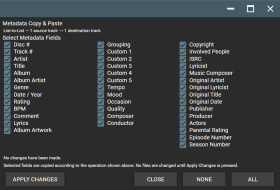
La funzione Copia e Incolla Metadati introduce funzionalità flessibili per copiare e incollare i metadati in MediaMonkey 5 Mobile.
Copia i metadati selezionati da una o più tracce sorgente e incollali in una o più tracce di destinazione utilizzando quattro modalità di trasferimento:
• Uno a uno
• Da lista a lista
• Da uno a molti
• Molti a uno
La schermata dettagliata di selezione dei campi consente di scegliere esattamente quali campi di metadati trasferire, tra cui Artista, Titolo, Album, Artista dell'album, Genere, Data/Anno, Valutazione, BPM, Commento, Testo, Compositore, Direttore d'orchestra, Editore, Produttore, campi personalizzati e altri metadati di traccia supportati.
È possibile selezionare anche le copertine degli album per il trasferimento, sia insieme ai metadati che separatamente.
Questo componente aggiuntivo è progettato per offrire funzionalità simili alle funzioni Copia metadati / Incolla metadati presenti nella funzione Ricerca e correzione duplicati avanzata di MediaMonkey 4, adattate per MediaMonkey 5 Mobile.
Translated automatically (see original)Metadata Copy & Paste brings flexible metadata copying and pasting to MediaMonkey 5 Mobile.
Copy selected metadata from one or more source tracks and paste it to one or more destination tracks using four transfer modes:
• One-to-One
• List-to-List
• One-to-Many
• Many-to-OneThe detailed field-selection screen lets you choose exactly which metadata fields to transfer, including Artist, Title, Album, Album Artist, Genre, Date/Year, Rating, BPM, Comment, Lyrics, Composer, Conductor, Publisher, Producer, custom fields, and other supported track metadata.
Album Artwork can also be selected for transfer, either together with metadata or independently.
The addon is designed to provide functionality similar to the Copy Metadata / Paste Metadata features found in MediaMonkey 4's Advanced Duplicate Find & Fix, adapted for MediaMonkey 5 Mobile.
Hide original
By
Project 37
Inviato da Project37
Aggiornato 21/09/2026
Cronologia delle versioni / Dettagli
- Versione:
- 3.3.3
- Aggiornato:
- 21/09/2026
- Size:
- 4.68 KB
- Licenza:
- None
- Funziona con:
- Media Monkey V2024.2.2 - V2024.2.2.3222
- Modifiche:
Version 3.3.3
Right click on a file and scroll down to "Edit tags" and then the popup screen will list "Copy Metadata" & "Paste Metadata" options.
• Added Album Artwork as a selectable transfer option.
• Album Artwork can be copied together with selected metadata or transferred independently.
• Album Artwork works with One-to-One, List-to-List, One-to-Many, and Many-to-One operations.
• Added support for transferring artwork across multiple source and destination tracks.
• Preserved the detailed metadata field-selection interface and existing transfer functionality.
• Tested on MediaMonkey 5 Mobile.

Annuncia il titolo e l'artista del brano in riproduzione tramite sintesi vocale e sovrapposizione di testo in caratteri grandi. Questo progetto personale è nato per imparare i titoli dei miei brani da DJ mentre li ascolto, in modo da poterli ritrovare più facilmente quando preparo un DJ set.
Translated automatically (see original)Announces the playing track title and artist via text-to-speech and large text overlay. This pet project was created as a means of learning the names of my DJ tracks as I listen to them so I can go back to them more readily when I am making a DJ set.
Hide original
By
MicroRaveNZ
Inviato da MicroRaveNZ
Aggiornato 21/09/2026
Cronologia delle versioni / Dettagli
- Versione:
- 1.0.8
- Aggiornato:
- 21/09/2026
- Size:
- 6.75 KB
- Funziona con:
- Media Monkey 5.0
- Modifiche:
Announces the playing track title and artist via text-to-speech and large text overlay. This pet project was created as a means of learning the names of my DJ tracks as I listen to them so I can go back to them more readily when I am making a DJ set.